WiFi Scanner is an 802.11 wireless scanner and connection manager. This will detect access points and clients in ad-hoc mode if the SSID is being broadcast. It can be used for wireless site surveys, wireless discovery, and connecting to Wi-Fi networks. The tool reports signal strength in dBm and shows access point BSSID/MAC addresses.

Download
3.4.0 · FREE
Download Now
3.4.0 · FREE · Universal
16.0 MB
Free Space Required
Universal
Apple Silicon & Intel
Universal
ARM64 & x86_64
- Features
- Screenshots 1
- Whats new?
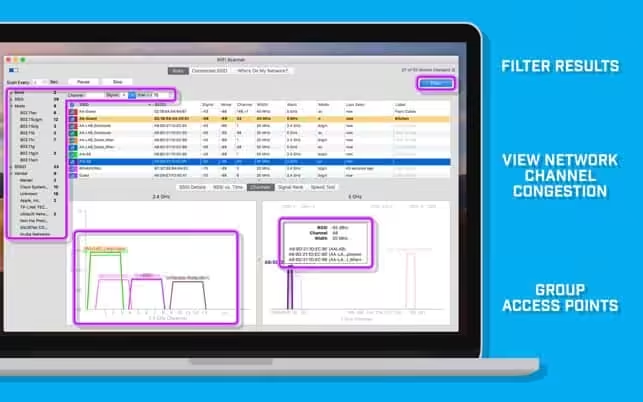
Using WiFi Scanner you’ll see nearby wireless access points and their details, including channels, signal levels (RSSI), noise, channel width, and MAC address, signal quality, maximum data rate, encryption, and much more.
It also includes upload and download speed testing to quickly measure and analyze WiFi Internet performance problems.
“…your wireless router is fighting for spectrum with its neighbors, potentially slowing you down and making your Internet experience less pleasurable. …WiFi Scanner helps you solve this problem by showing you all the access point(s) nearby, and suggesting the best configuration settings to get the most out of your router.” — MacWorld
Simple, fast wireless network discovery of 802.11 a/b/g/n/ac access points. WiFi Scanner is great for determining the best position for an access point at home or in the office.
After selecting the best position, the optimal channel to use can be determined by selecting the least used channel resulting in improved WiFi speeds.
Key Features- Simple, fast wireless network discovery of 802.11 a/b/g/n/ac access points.
- Connect to detected networks using the join button
- Full support for both 2.4 and 5 GHz networks
- Support for all channel bandwidths (20, 40, 80, and 160 MHz)
- Display detailed wireless network parameters: network name (SSID), signal level (RSSI), MAC address (BSSID), signal quality, channel, maximum data rate, encryption, etc.
- Display changes in signal level over time in graphical form.
- Filter list of detected wireless networks by specified parameters (SSID/network name, channel, channel band, signal strength)
- Display wireless connection statistics in the form of graphs and tables.
- Give each access point a custom label
- Export results to comma-separated value (CSV) files
- Generate summary reports in HTML format
- Upload and download WiFi speed testing
- Use speed testing feature to troubleshoot WiFi networks
- Autorun speed test when the client roams to the different access point
- Auto-repeat speed test with wait time between tests
- Fast IP scanner that detects unknown devices connected to your WiFi network.
- Detects hostnames, determines the MAC address, and in some cases can auto-detect device type (phone, laptop, router, etc).
- Configured icon for discovered devices is saved for future scans.
- Scanning results can be saved to CSV files via the menu export option.
- Great for finding WiFi “Piggybackers”.
- Display access point name if configured by the network administrator
- Display number of devices connected to each access point
- Display channel utilization
- Display if 802.11r is enabled and type
- Display if WiFi protection mechanisms are enabled
For questions, feature requests, or support please email [email protected] or contact us via Twitter @accessagility.
What's New in Version 3.4.0
- bug fixes and improved performance
Older versions & Compatibility
Running macOS Catalina, Big Sur, Monterey, or Ventura? Download tested builds for Intel and Apple Silicon.
-
3.4.0 LatestOct 18, 2026 · 16.0 MB · Universal
Verified secure servers
Official Website






No comments yet
Share whether this build worked on your Mac, on which macOS version, and your tips.