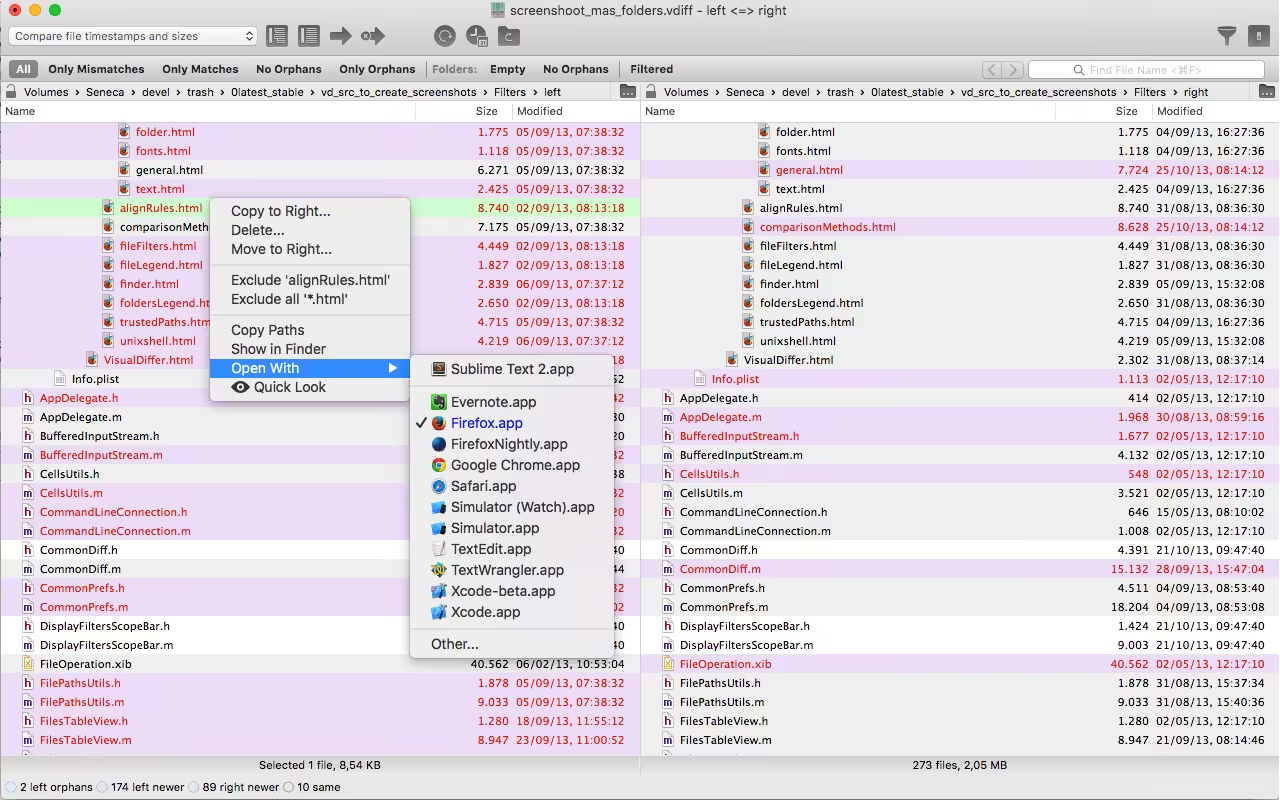
Visual Differ compares side-by-side folders and files using colors to visually show differences. From the Folder view, it’s possible to make operations on folders and files like copying or deleting. It’s possible to quickly compare directories by choosing base folders from the context menu. Using the File Filter feature is possible to hide from visualization-specific files like .git, .svn directories, or the omnipresent.DS_Store files.
Download
1.8.10 · FREE
Download Now
1.8.10 · FREE · Universal
6.8 MB
Free Space Required
Universal
Apple Silicon & Intel
Universal
ARM64 & x86_64
- Features
- Screenshots 1
- Whats new?
- It’s possible to compare quickly directories choosing base folders from the context menu. Using the File Filter feature is possible to hide from visualization specific files like .git, .svn directories or the omnipresent .DS_Store files.
- The folders comparison can be done using different techniques from the fastest “compare only date and size” to the fine-grained byte-by-byte comparison.
- The file comparison is done using the UNIX diff command this choice makes the result quick, standard, and reliable.
- It’s possible to save work sessions then quickly reopen them to compare directories hierarchies or directly two specific files.
What's New in Version 1.8.10
- Added sort columns in Folder View (Sort by filename, size, and modification date)
- Fixed crash on Big Sur Preview
- Fixed UI bugs (file path not visible, bottom bar disappearing)
- Fixed crash when comparing big files
- Fixed Dark Mode UI (Dark mode is not yet supported but at least the colors UI are correct)
Older versions & Compatibility
Running macOS Catalina, Big Sur, Monterey, or Ventura? Download tested builds for Intel and Apple Silicon.
-
1.8.10 LatestOct 25, 2026 · 6.8 MB · Universal
Verified secure servers
Official Website




No comments yet
Share whether this build worked on your Mac, on which macOS version, and your tips.