Wondershare Filmora is an easy-to-use yet powerful video-editing app to edit and retouch videos with rich video and photo editing functions like trimming, cropping, rotating, adding stylish titles, applying filter effects, inserting transitions and motion effects, etc. Furthermore, you can export videos to various popular video formats and portable devices for wider sharing and enjoyment or directly upload them to YouTube for sharing with family and friends.

Download
14.8.17 · FREE
Download Now
14.8.17 · FREE · Universal
1.8 GB
Free Space Required
Universal
Apple Silicon & Intel
Universal
ARM64 & x86_64
- Features
- Screenshots 1
- Whats new?
Support Editing Videos of any type
- Import your videos/photos shot by iPhone, GoPro, camcorder, or other devices.
- Download photos/videos directly from Facebook, Instagram, and Flickr.
- Record anything appearing on your Mac screen with a voice-over.
- Take snapshots for your video clips at any moment you like.
- Scan video clips for scene changes, to separate footage into individual cuts for advanced editing.
- Enhance your movie by adding TEXT/CREDIT, such as Opener, lower 3D, 100% customizable.
- Over 1000 hundred filters and overlays for you to choose from, all are free and well designed.
- Add more fun to your movie with the Mosaic and Blur face effects.
- Create unique videos and slideshows with various transitions and elements.
- Cut, merge, trim, rotate, and crop any video files like MP4, FLV, AVI, MKV, WMV, MP3, JPG, etc.
- Create a Time-lapse and Fast/Slow-motion video by adjusting the playing speed as you like.
- Bring your work to the next level with Green Screen, Split Screen, and Picture-in-picture effects.
- Stabilize your shaky Action Cam footage in one click.
- Add some style to your videos by easily transforming them into fun, tilt-shift-style miniature scenes.
- Give your story a new style with easy-to-use color controls.
- Precise control over both video and audio frame by frame.
- Choose royalty-free music or audio effects from the library, a hand-chosen compilation of artists from the Pacific Northwest, with genres ranging from Hipster Folk to Electric Pop.
- Apply music from your own iTunes collection
- Allow you to adjust speed, volume, and pitch of audio and you can fade in/out the audio at any part.
- Share directly to YouTube, Vimeo, and more.
- Burn videos to DVD with high quality and speed.
- Export your clips to the iPhone, iPad, Apple TV, and other devices.
- Preserve videos on your Mac in format MP4, MOV, F4V, MKV, etc.
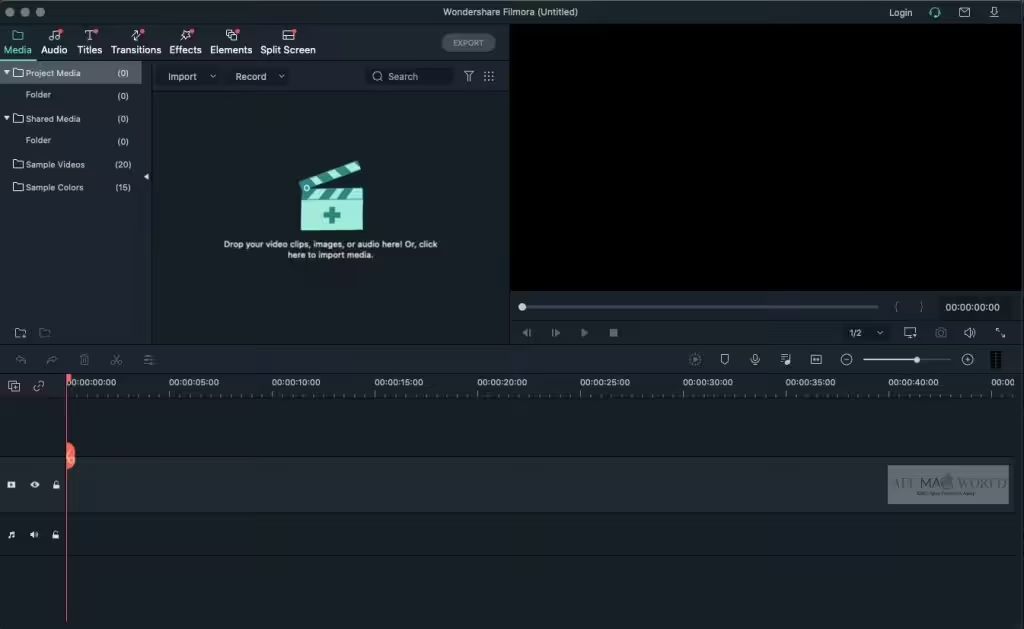
- Step 1. Import the media files into Filmora
Filmora supports editing videos of any type, including .mpg, .mpeg, .mp4, .m4v, .mov, and more. - Step 2. Start editing the video
Drag and drop the media files to the timeline, and then start your video editing. Cut the video clip or add video effects. - Step 3. Add and adjust the audio
Pick a piece of proper background music or sound effects to power up your video. - Step 4. Save & share the video
Save the video to the local disk, or directly share it to YouTube and Vimeo via Filmora.
[User Guide]: https://filmora.wondershare.com/guide-mac/
What's New in Version 14.8.17
- Fix performance issues and optimize account experience.
Older versions & Compatibility
Running macOS Catalina, Big Sur, Monterey, or Ventura? Download tested builds for Intel and Apple Silicon.
-
14.8.17 LatestOct 16, 2026 · 1.8 GB · Universal
Verified secure servers
Official Website


No comments yet
Share whether this build worked on your Mac, on which macOS version, and your tips.