DAEMON Tools is a solution for mounting and creating CD/DVD/HDD disc images. With the program, the system recognizes the virtual images and allows you to work with them as with ordinary discs. DAEMON Tools is a compact and smart solution for mounting different types of virtual discs on Mac, which lets you create ISO, MDX, and MDS/MDF images.

Download
6.3.419 · FREE
Download Now
6.3.419 · FREE · Universal
9.4 MB
Free Space Required
Universal
Apple Silicon & Intel
Universal
ARM64 & x86_64
- Features
- Screenshots 1
- Whats new?
- The ability to mount images gives you access to the different types of virtual discs.
- The creation of data and Audio images allows you to make virtual discs from folders with files.
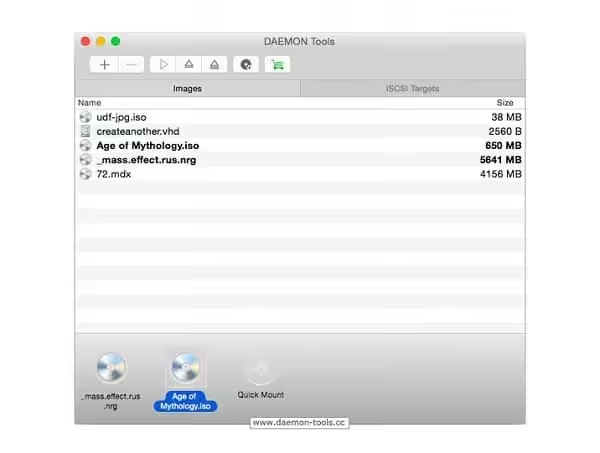
- The application window allows you to use the full functionality of the program from the smart and adjustable interface
- Automatic restart of the program, the ability to keep images mounted even after the program is closed, and the Remount option make usage more convenient and easy as ABC.
- Images tab provides the most comfortable access to the images you need.
- DAEMON Tools menus in the menu bar and Dock give access to the most important features of the program.
- iSCSI Initiator allows you to access the remote physical or virtual devices shared on an iSCSI Server.
- Hotkeys that can be set in the program make working with images easier.
- Mount images in the following supported formats: *.b5t, *.b6t, *.bwt, *.ccd, *.cdi, *.bin/*.cue, *.ape/*.cue, *.flac/*.cue, *.iso, *.isz, *.mds/*.mdf, *.mdx, *.nrg, *.pdi, *.dmg, *.vhd, *.tc, *.zip.
- Use the list of mounted devices with images of all formats in Finder under Devices category
- View history list of recently mounted images
- Make use of system hotkeys for mounting and ejecting
- Use Autostart and Automount options
- Get automatic notifications about updates
- Set DVD region for a drive;
- Mounted device quantity is not restricted any longer.
- Make ISO, MDX, and MDS/MDF images
- Use custom virtual discs for backups
- Compress created images to save the hard disk space
- Encrypt custom images to protect important data
What's New in Version 6.3.419
- Add custom names to network devices improvements
- Small improvements
Older versions & Compatibility
Running macOS Catalina, Big Sur, Monterey, or Ventura? Download tested builds for Intel and Apple Silicon.
-
6.3.419 LatestOct 22, 2026 · 9.4 MB · Universal
Verified secure servers
Official Website





No comments yet
Share whether this build worked on your Mac, on which macOS version, and your tips.