Capture One is a professional RAW converter offering you ultimate image quality with beautiful colors and incredible detail for more than 500 high-end cameras. It offers state-of-the-art tethered capture, powerful digital asset management, extensive adjustment tools, and a flexible workflow through customizable workspaces.

Download
4 versions
Download Now
16.9.0.10 · FREE · Universal
1.7 GB
Free Space Required
Universal
Apple Silicon & Intel
Universal
ARM64 & x86_64
- Features
- Screenshots 1
- Whats new?
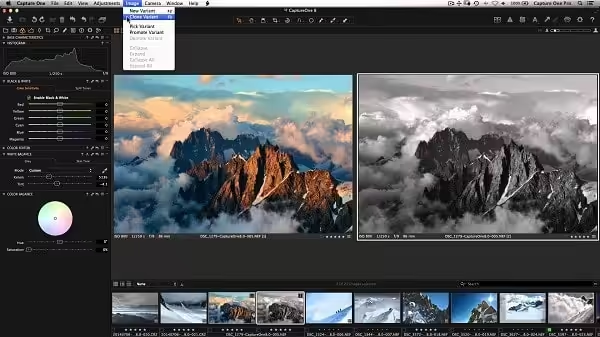
- All About Color: Capture One 20 Pro is known for its exceptional handling of color. Thanks to our custom camera profiling, every RAW file shines – straight from the camera. Whether you seek creative color grading tools or want to ensure natural colors in your images, Capture One delivers powerful and precise tools to achieve your vision.
- Full Control: Every tool in Capture One Pro is designed to give you full control of all aspects of the editing process – preserving, recovering, and optimizing all information from your RAW files. The full range of tools offers extensive possibilities to always achieve perfect results.
From customizable tools and keyboard shortcuts to graphics acceleration and instant tethered capture built to minimize your workload and maximize your efficiency. Design your own workspace and find your way of working.
- The benefit of RAW: Capturing RAW files enables a broad scale of possibilities for tweaking your images, as RAW files have the full range of the captured information available from your camera. Capture One is focused on getting the most out of every RAW file. All supported camera models and lenses have custom-tailored profiles to ensure the best colors and details available. Capture One 20 Provides a solid solution for editing any supported RAW file.
- Full Control: Capture One Pro has been developed with image quality and ease of use in mind. Every tool is designed to give you full control of all aspects of the editing process – preserving, recovering, and optimizing all information from your RAW files. The full range of tools offers extensive possibilities to always achieve perfect results.
With image quality as the driving factor, Capture One is developed to squeeze every RAW file to the limit, providing the highest level of details possible. Each supported lens applies a custom-made lens profile, providing precise tools for minimizing distortion and light fall-off.
- Tethered Capture: Industry-leading tethered capture is fast, flexible, and reliable, for those photography sessions where speed and accuracy are important. Shoot directly to your computer for an almost instant viewing experience – with or without instant adjustments. Enable Live View for easier composing when shooting still-life photography.
- Workflow and Performance: From customizable tools, keyboard shortcuts to graphics acceleration, and instant tethered capture – Capture One Pro is built to minimize your workload and maximize your efficiency. Design your own workspace and decide your own way of working.
What's New in Version 16.9.0.10
- Fixed an issue where Styles were not applied to iPhone 15 Pro Max DNG
- Fixed an issue where files exported to iCloud become hidden in macOS Sonoma
Older versions & Compatibility
Running macOS Catalina, Big Sur, Monterey, or Ventura? Download tested builds for Intel and Apple Silicon.
-
16.9.0.10 LatestOct 30, 2026 · 1.7 GB · Universal
-
16.8.0.32 ArchivedOct 16, 2026 · 1.89 GB · Universal
-
16.8.6.25 ArchivedOct 30, 2026 · 1.7 GB · Universal
-
16.8.5.30 ArchivedOct 30, 2026 · 1.7 GB · Universal
Verified secure servers
Official Website




No comments yet
Share whether this build worked on your Mac, on which macOS version, and your tips.