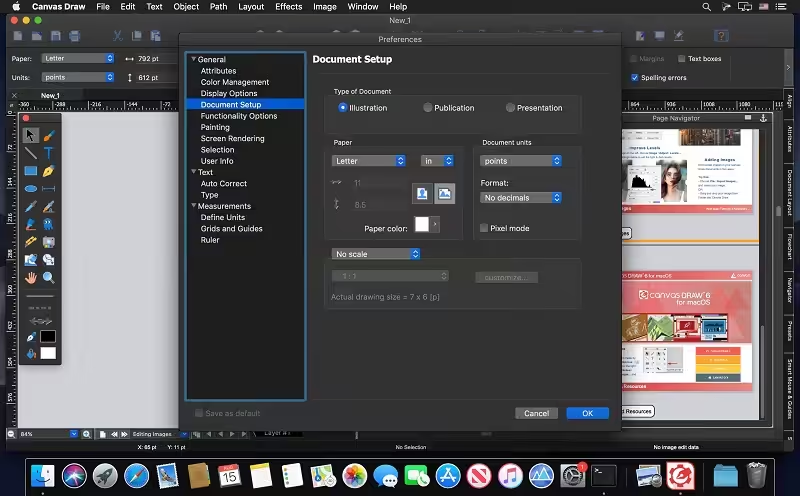
Canvas Draw is a powerful software specifically designed to make it possible for small business owners, designers, illustrators, and professionals to advertise and communicate with confidence. It helps you to visualize your workflow with a diverse content creation tool able to combine adaptable text, image, object, and effect elements in a single document. Canvas Draw 6 services the creation of mechanical documentation, including assembly, maintenance, and repair instructions.

Download
6.0.3 · FREE
Download Now
6.0.3 · FREE · Universal
232.9 MB
Free Space Required
Universal
Apple Silicon & Intel
Universal
ARM64 & x86_64
- Features
- Screenshots 1
- Whats new?
All-in-one Graphics Tool
- Create incredible graphics combining adaptable text, image, object, and effect elements in a single document.
- Create visual documentation including assembly, maintenance, and repair instructions.
- Save time illustrating complicated procedures, processes, and workflows with the convenience of built-in templates and over 2000 symbols.
- Take advantage of both vector and advanced raster image editing tools all in one great macOS application.
Creative Illustration: Creating a strong, cohesive brand is the most powerful move a small business can make. Canvas Draw provides all of the drawing, painting, image editing, and typing tools and effects you could possibly need to establish solid brand recognition through your media assets.
Visualize Technical Illustration: All technical drawings share a common need for top-notch precision. Canvas Draw answers this need with dimensioning tools that measure distances for you, calculate angles, affirm scale, join objects with mathematical accuracy, and much, much more, all while conforming to industry standards and allowing you to choose the units.
Canvas Draw at Work: Create visualizations of spatial information with the incredible Canvas Draw toolset. Flexible technology allows you to apply effects to vector objects, text, and grouped objects, as well as image objects. You can even work with AutoCAD files.
Publishing & Presentations: Getting your message out into the world has never been this easy. Whether presenting on-screen or preparing for high-quality publication, you can enjoy complete control over print settings, such as document size and type, color management and image resolution, as well as slide show execution options for immediate delivery.
What's New in Version 6.0.3
- Improvements
- Effect | Combine can be directly applied to EasyShapes.
- Zoom in and out icons are added in the Preview window of the JPEG Export Options dialog box.
- “Proxy icon” will be available in front of the file name in the document title bar after the document is saved.
- The keyboard shortcut Command+Control+A is assigned to Object | Attributes to open the Attributes palette.
- Selection background color in the Document Layout palette now respects the “Highlight color” setting in the macOS General Preferences.
Older versions & Compatibility
Running macOS Catalina, Big Sur, Monterey, or Ventura? Download tested builds for Intel and Apple Silicon.
-
6.0.3 LatestOct 25, 2026 · 232.9 MB · Universal
Verified secure servers
Official Website




No comments yet
Share whether this build worked on your Mac, on which macOS version, and your tips.