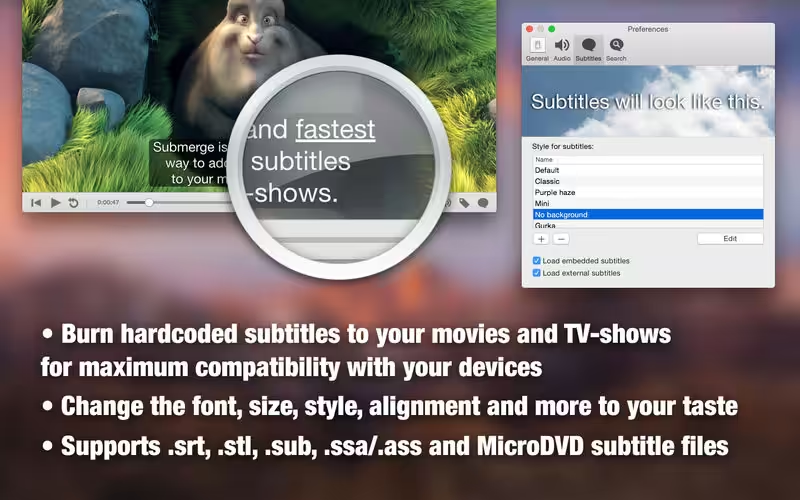
Submerge is the easiest way to add hardcoded subtitles to your movies and TV shows. The subtitled movie will play on almost anything, like your computer, smartphone, portable device, or game console. Submerge supports many text-based subtitle formats as input, and you can export the subtitled movie for the most common devices in just one click.

Download
3.9.1 · FREE
Download Now
3.9.1 · FREE · Universal
53.8 MB
Free Space Required
Universal
Apple Silicon & Intel
Universal
ARM64 & x86_64
- Features
- Screenshots 3
- Whats new?
- Add hardcoded subtitles to almost any video file without the need for extra system extensions or plug-ins.
- Automatically loads and displays embedded subtitles or subtitles from external files.
- Support for many subtitle formats like srt, sub, itt, stl ass/ssa and vtt.
- Supports styling tags in subtitle files like italic, bold underlined and font color.
- Supports cue settings in WebVTT files to handle the position and alignment of the subtitles.
- Fully customizable subtitle display (font, size, color, shadows, etc).
- Automatically finds metadata online to tag your movie.
- Detailed movie inspector for all those nitty gritty details.
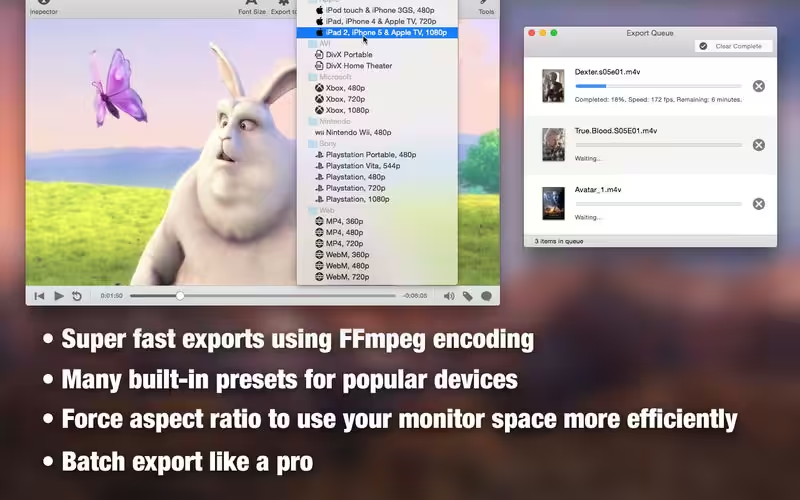
- Many export presets built-in for poplar devices.
- Batch export queue built right in.
- FFmpeg encoding for fastest possible exports.
- Force aspect ratio to 16:9, 4:3 or 3:2 to use your monitor space more efficiently.
- Fullscreen player built-in (of course).
- Playback with hardware decoding on the GPU for H.264 and H.265 (HEVC) video tracks.
- Support for macOS Catalina and Big Sur.
- 64-bit native.
NOTE! Submerge cannot add hardcoded subtitles to movies or tv-shows purchased or rented in the iTunes store due to DRM protection.
What’s new in Submerge 3- Re-written from the ground up using modern OS X technologies.
- Doesn’t depend on QuickTime.
- No need for extra system extensions or plug-ins to open and add subtitles to your movies.
- 64-bit native.
- Batch export queue.
- Improved the built-in subtitle search engine. Really easy to use.
- Metadata tagging for the TV-app and iDevices. Artwork as well.
- Support for more than two subtitles lines and smarter wrapping.
- Optional “Title Safe Area” for old TV sets and professionals.

What's New in Version 3.9.1
- Playback with hardware decoding on the GPU for H.264 and H.265 (HEVC) video tracks.
- Playback with hardware decoding also works for containers like .MKV (Matroska)
- Playback with hardware decoding saves battery life and CPU cycles.
- Easily plays 4K video when hardware decoding is available.
- Time offset for subtitles now works again.
Older versions & Compatibility
Running macOS Catalina, Big Sur, Monterey, or Ventura? Download tested builds for Intel and Apple Silicon.
-
3.9.1 LatestOct 21, 2026 · 53.8 MB · Universal
Verified secure servers
Official Website






No comments yet
Share whether this build worked on your Mac, on which macOS version, and your tips.