MacClean360 Pro offers an easy and reliable cleanup solution to help you remove all junk data inside your Mac. The junk cleaner can clean up system junk, App junk, iTunes junk, Email junk, trash bin junk, and other junk files with only one click. The best way to free up disk space and speed up slow Mac.

Download
5.4 · FREE
Download Now
5.4 · FREE · Universal
5.8 MB
Free Space Required
Universal
Apple Silicon & Intel
Universal
ARM64 & x86_64
- Features
- Screenshots 1
- Whats new?
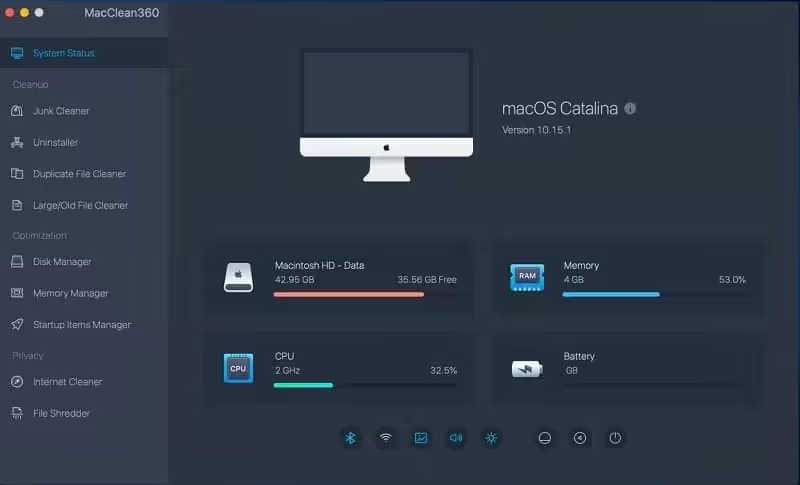
- Junk Cleaner: Junk cleaner can help you scan the Mac system and find all junk data including system junk, App junk, iTunes junk, email junk, and trash bin junk. After scanning, the user is able to clean up all junk data inside the Mac with 1 click
- Uninstaller: You can uninstall unwanted applications and clean up all associated files with 1 click. Just choose the applications, then click on the “Uninstall” button to uninstall all useless applications
- Duplicate File Cleaner: Find and remove duplicate files on your Mac
- Large/Old File Cleaner: Find and remove useless large files or old files on Mac
- Disk Manager: Disk manager can help you manage disks and external devices on the Mac. You can format or rename the hard drive or device on Mac and help you eject external device on Mac securely
- Memory Manager: Speed up slow Mac by closing useless tasks on Mac
- Startup Items Manager: Add or remove startup items on Mac
- Internet Cleaner: Clean up browsers’ cookies, caches, logs, passwords, junk files, etc
- File Shredder: Permanently erase files/folders from Mac or storage device to prevent data recovery
MacClean360 also allows you to easily manage frequently used Switches on your Mac, including:
- Hide Desktop Icons – Hide/show the desktop items on your Mac.
- Hide Dock – Hide/show the dock on the screen.
- Dark Mode – enable/disable dark mode on your Mac.
- Display Hidden Files – Show all hidden files on your Mac.
- Screen Saver – Enter screen saver.
- Keep Awake – Keep your Mac away from sleeping or screen saver.
- Do Not Disturb – Disable notifications on Mac.
- Night Shift-Enter night mode with 1 click.
What's New in Version 5.4
- Improved disk manager
- Fixed a few bugs
Older versions & Compatibility
Running macOS Catalina, Big Sur, Monterey, or Ventura? Download tested builds for Intel and Apple Silicon.
-
5.4 LatestOct 21, 2026 · 5.8 MB · Universal
Verified secure servers
Official Website




No comments yet
Share whether this build worked on your Mac, on which macOS version, and your tips.