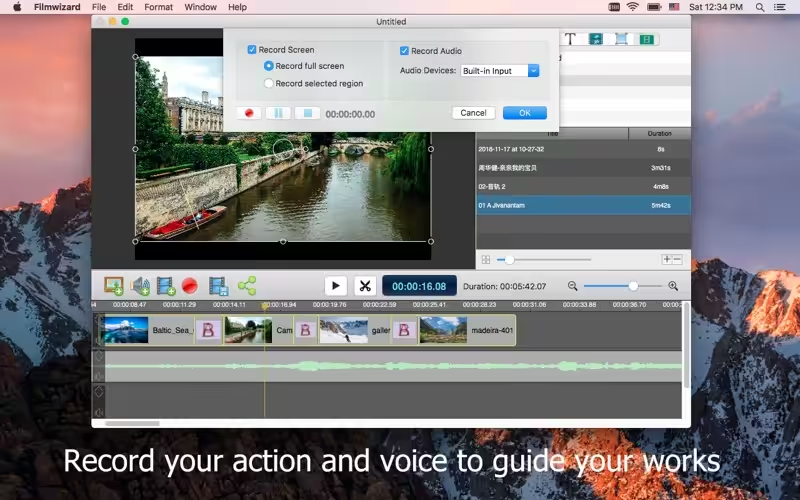
Filmwizard is an easy-to-use tool for making movies. It’s can record, edit and create high-quality movies and encode them as MPEG-4 files, or publish them directly to video sites such as Youtube, for your audience to enjoy.

Download
3.5.0 · FREE
Download Now
3.5.0 · FREE · Universal
21.9 MB
Free Space Required
Universal
Apple Silicon & Intel
Universal
ARM64 & x86_64
- Features
- Screenshots 1
- Whats new?
Import, edit, and share
With Filmwizard, you can easily import photos from Photos, music/video from iTunes, and record voice from the microphone.
The easy-to-use editing interface lets you creatively edit your video, and music and add additional photos, texts, and annotations, with motions and transitions for a truly professional-looking movie. With a built-in sharing feature, you can easily publish the movie to your website, blog, or directly to Youtube or Vimeo.
Making movies in FilmwizardImport your own movie clips into the built-in media library, which makes the clips easily reuse, and then drop them right into the timeline. With Filmwizard’s essential editor features, you can easily join, split, detach audio, and sync clips without overlaps, then add transition effects, annotations, and texts and voices.
Filmwizard helps you do what you want to, it doesn’t force you to become a professional editor just to get the job done. Everything you need is at your fingertips: split clip, cut blank, detach audio, fade sound, add motion and transitions, and record voice with a microphone.
Making slide shows in FilmwizardWith a built-in media library, drop the photos right into the timeline, and adjust each photo to display just the right length of time. Make great transitions, create text overlays and annotations, and drop the music as background sound. Just like movies, you can export as an MP4 video and share it with friends.
Sharing to video websiteAfter exporting to MP4 video, you can share with friends with built-in sharing features. You can share the video on Youtube, Facebook, Vimeo, Flickr, Twitter, e-mail, message, airdrop, and so on.
Support Import Format- Photo format: JPG, JPEG-2000, PNG, BMP, TIFF, GIF
- Audio format: AAC, AC3, AIFF, AMR, 3GA, APE, AU, DTS, EA, EAC3, FLAC, MP3, WMA, MKA, OGG, MP2, M4A, WAVE
- Video format: ASF, AVI, AVS, AVR, DV, FILMSTRIP, FLV, MV, NUT, M4V, RM, MOV, MP4, RMVB, TS, MTS, MKV, WEBM, XMV, WMV, MPG, MPEG, M2TS, AVC, TP, 3GP, 3G2, F4V
- MP4 file with high-quality AVC/HEVC encoded
- M4A file with high-quality AAC encoded
- MP3
- WAVE
What's New in Version 3.5.0
- Release notes were unavailable when this listing was updated.
Older versions & Compatibility
Running macOS Catalina, Big Sur, Monterey, or Ventura? Download tested builds for Intel and Apple Silicon.
-
3.5.0 LatestOct 26, 2026 · 21.9 MB · Universal
Verified secure servers
Official Website






No comments yet
Share whether this build worked on your Mac, on which macOS version, and your tips.