Default Folder X revolutionizes macOS Open and Save dialogs by attaching a powerful toolbar, providing instant access to favorite and recent folders. This essential macOS System Utility streamlines file management, allowing users to navigate and organize effortlessly. Fully optimized for modern macOS, including Apple Silicon, it significantly boosts productivity for every Mac user.

Download
5 versions
Download Now
6.3.3 · FREE · Universal
31.9 MB
Free Space Required
Universal
Apple Silicon & Intel
Universal
ARM64 & x86_64
- Features
- Screenshots 2
- Whats new?
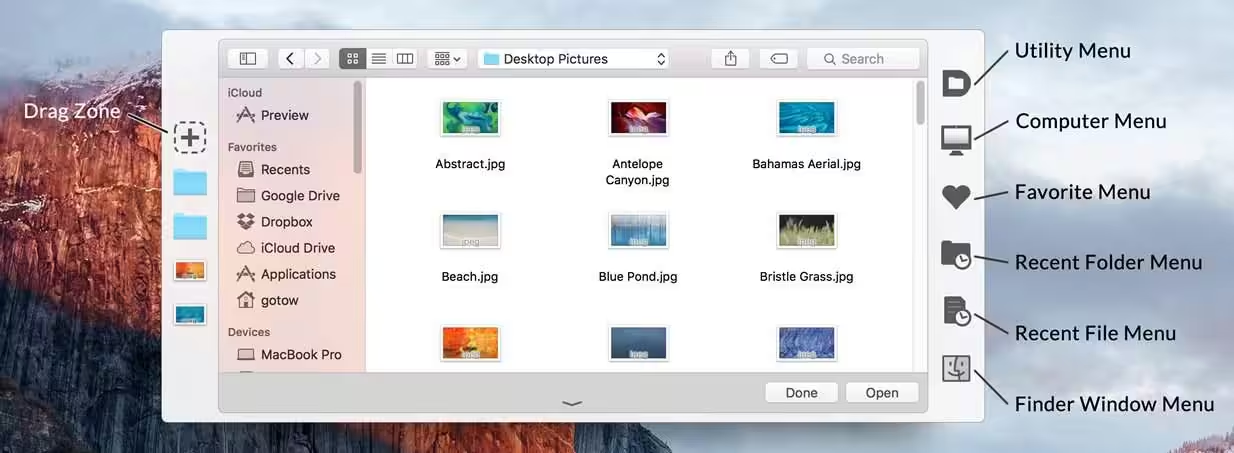
- Enhanced Dialog Toolbar: Integrates a powerful, customizable toolbar directly into macOS Open and Save dialogs for efficiency.
- Quick Folder Access: Instantly navigate to favorite, recent, and custom folders, significantly speeding up file selection.
- In-Dialog File Management: Perform essential file and folder operations like renaming, moving, and creating directly within dialogs.
- Customizable Workflow: Personalize toolbar buttons, keyboard shortcuts, and display options to match your unique needs.
- Recent Items History: Access a comprehensive history of recently used files and folders for rapid, intelligent re-selection.
- Real-time Folder Previews: View contents of selected folders without leaving the dialog, improving navigation and decision-making.
- Finder Integration: Seamlessly interact with the Finder, providing robust file and folder manipulation from any application.

What's New in Version 6.3.3
- Fixed a bug that could cause folder switching to fail in Open and Save dialogs. This could result in the mouse cursor disappearing or the file dialog hanging until you clicked on it.
- Corrected two issues that could leave Default Folder X’s toolbar displayed even when a
- QuickLook window popped up in front of an Open or Save dialog.
- Improved error handling when Default Folder X is unable to select the last selected file in an Open dialog.
- Fixed a problem with Open and Save dialogs hanging when using the macOS Accessibility Zoom feature.
- Improved the wording in the “Launch Default Folder X automatically when you log in?” dialog.
- Fixed the text alignment in the menu configuration sheet.
- Added a setting so you can use the left and right arrow keys to edit text in the Quick
- Search window. To move into and out of folders in the search results, use the Tab and
- Shift+Tab keys instead. Use this command in Terminal to enable the setting:
defaults write com.stclairsoft.DefaultFolderX5 quickSearchTraversesWithTabKey -bool YES
Older versions & Compatibility
Running macOS Catalina, Big Sur, Monterey, or Ventura? Download tested builds for Intel and Apple Silicon.
-
6.3.3 LatestOct 21, 2026 · 31.9 MB · Universal
-
6.3.2 ArchivedOct 12, 2026 · 31.9 MB · Universal
-
6.3.1 ArchivedOct 23, 2026 · 31.9 MB · Universal
-
6.3.0 ArchivedOct 23, 2026 · 31.9 MB · Universal
-
6.2.8 ArchivedOct 23, 2026 · 31.9 MB · Universal
Verified secure servers
Official Website





No comments yet
Share whether this build worked on your Mac, on which macOS version, and your tips.