Cisdem DataRecovery – the Best Data Recovery Software for Mac OS X. Safely recover photos, documents, videos, music, archive, etc. Truly recover data from Mac hard drive & external drive, memory card, MP3 player, etc. With the latest scanning algorithm upgrade, Cisdem Data Recovery for Mac can scan and recover data from internal, and external hard drives safely. Now you can even preview files while the scanning process.
Download
13.8.5 · FREE
Download Now
13.8.5 · FREE · Universal
48.5 MB
Free Space Required
Universal
Apple Silicon & Intel
Universal
ARM64 & x86_64
- Features
- Screenshots 1
- Whats new?
- Improper Operation: Turn off the disk during writing, improperly pulling out the SD card.
- Power Off: Sudden power cut-off when processing files.
- Factory Reset: Reset devices to the manufacturer’s specifications.
- Mistaken Deletion: Click “Move to Trash”, “Command + Del”, empty Trash.
- Formation: Format Mac hard drive, memory card, USB drive, etc.
- Virus Attack: Attacked by an unknown virus, malware, or ransomware.
- OS Reinstallation: Using Recovery Mode to reinstall the system without backup.
- Disk Crash: Hard drive disk crashed and no files were found when re-connected with Mac.
- Deeply Find Any File Type: Recover whatever you lost, including raw pictures.
- Selectively Recover What You Want: You can choose the items that you need to recover.
- Check & Preview Lost Data for Free: Scan all lost data & preview the details in the trial version.
- Classify Recoverable Data by File Types: According to file types, the files are clearly listed to you.
- Quick/Deep Scan: Quick scan to recover recently deleted files, and use a Deep scan to dig out more files.
- File Type Filtering: You can choose the preferred file type to scan: Document, Media, Archive, and Universal.
- Three Easy Steps: Only 3 steps: Choose Quick/Deep Scan – Scan Your Devices – Preview & Recover Data.
- Specify File Extensions: You can set what extensions of files to be scanned in the setting window.
- Estimate Scanning Time: Show you how long the whole scanning process will take in progressing bar.
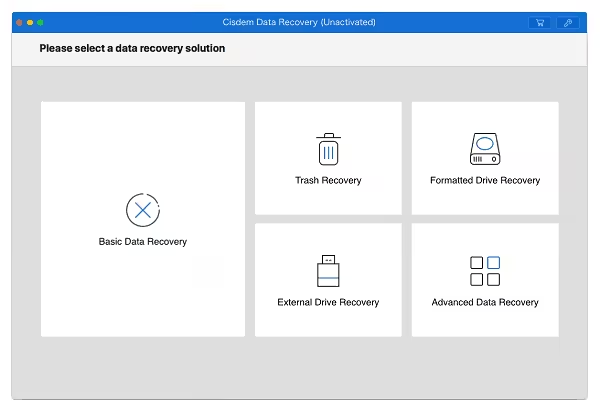
What's New in Version 13.8.5
- Optimized Interaction of scanning process and a new entry for quick scanning of other devices.
- Optimized Interaction of scanning complete interface.
- Optimized scanning experience on FAT, ExFAT file system device.
Older versions & Compatibility
Running macOS Catalina, Big Sur, Monterey, or Ventura? Download tested builds for Intel and Apple Silicon.
-
13.8.5 LatestOct 24, 2026 · 48.5 MB · Universal
Verified secure servers
Official Website




No comments yet
Share whether this build worked on your Mac, on which macOS version, and your tips.